
Your CMMS
Equipment, work order or maintenance schedule imported.
Give the technician the source job context in the prepared task.
Equipment checks and maintenance follow-through
We connect the failed check, repair and review so your team can follow the finding through a parts wait, resumed work and an evidence-based return-to-use decision.
Finding Repair Verification
Roles, playbooks and a practical launch plan for your team.
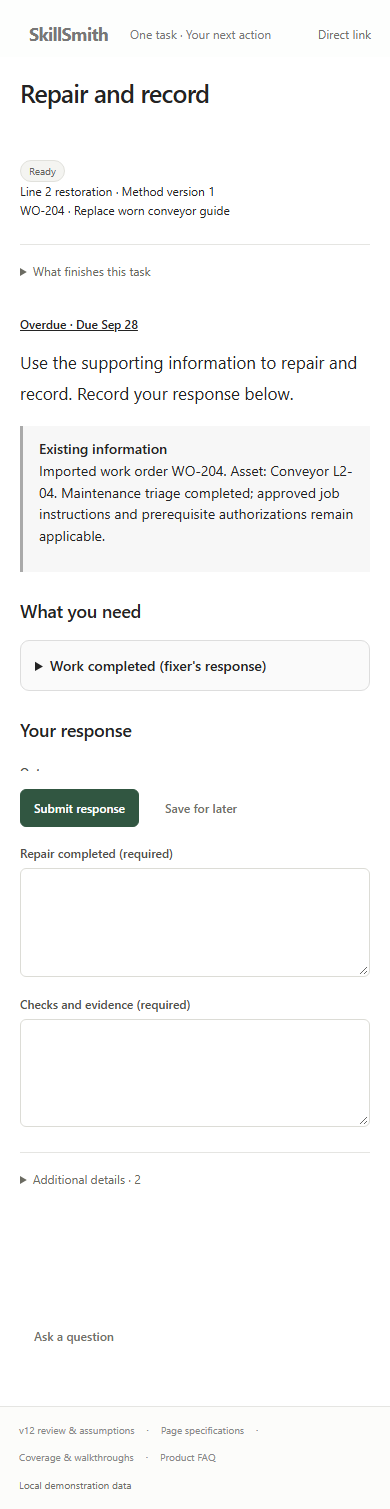
Your technician opens the prepared repair task.

Agree the outcome for your first workflow with our team.
Trusted by leading organizations




“SkillSmith has always been very professional and responsive throughout the entire process and an absolute pleasure to work with.”
Paul HildebrandDirector of HSE/DOT, Jones Power
Your operational priorities
You are balancing production demands with equipment checks, repairs and shift changes. We help you keep the follow-up clear when a job needs another team, a replacement part or a final review.
Connected work across your team
We organize your instructions, forms and handoffs into prepared playbooks. Your managers choose the work, and your associates receive the task and context for their contribution.
Operator → maintenance lead
A pre-use check finds a worn conveyor guide. The operator follows the immediate site response and records the asset, failed item and observation. The lead selects or opens the repair with that evidence attached.
SkillSmith

Maintenance technician → lead
The technician opens the repair with its triage and approved instructions. When replacement pieces are missing, they save the unfinished response and ask the lead from the task. The lead starts linked parts work.
SkillSmith
Receiving → maintenance lead
Two pieces are required and one arrives. Receiving records the accepted quantity and owns the remainder. The lead owns the waiting repair and operator update, then decides when materials and other prerequisites permit the technician to resume.
Verifier → authorized site lead
The verifier reviews the repair and returns a missing prescribed check-result reference to the technician. After resubmission, the verifier assesses the corrected response. The authorized site lead makes the return-to-use decision under the site procedure.
Connected information and agent support
We tailor the setup to your records, team structure and communication needs. Your leaders can then ask our agents for help with an unusual question or a change that would take time to gather by hand.
Example source systems
Bring equipment, work-order context and supporting instructions into the task.
Keep prepared work and resources available to the relevant team.

Keep a question connected to its task and the colleague who can help.



We bring the relevant
context into your work
Your CMMS
Give the technician the source job context in the prepared task.
Your purchasing records
Link the repair, order reference and actual receipt in the parts task.
Your document library
Keep that reference with the technician's task and response.
Evidence Collector
Your maintenance lead can inspect overdue task records with their owners and deadlines, then decide which repair follow-up needs attention.
Data Manager
Review the selected tasks and proposed dates before applying the change.
Keep the conversation moving
Keep a clear overview of how our platform supports your repair handoffs, connects your records and helps your team get started.
PDF · 6 pages
Our delivery approach
We work through the details with your team, from the first equipment group to the handoffs you want to improve. Each stage leaves you with something concrete to review.
We review your check forms, common repair situations and shift handoffs with your operational leads.
What we prepare togetherYour priority equipment group and named responsibilities.
We help organize your instructions, response forms, access and assignment rules around the work you already do.
What we prepare togetherYour prepared playbooks, resources and agreed connections.
Your team tries an ordinary repair, a partial delivery and a returned check result. We refine the setup wherever responsibility or evidence is unclear.
What we prepare togetherA route the operator, technician, receiving team and verifier can follow.
We agree what to assess in the completed work, then use those findings to plan the next equipment group.
What we prepare togetherA shared view of completion, quality and coordination effort.
Talk with our team
Bring us the work your team wants to improve. We’ll walk through your instructions, responsibilities and review criteria, then show how our platform can support that work.
Your procedures and work records give us the starting point. Together, we identify what belongs in the task, what should remain a supporting reference and which decisions stay with your supervisors.
Your approved proceduresWe help organize the instructions and forms your associates need.
Your existing work recordsWe agree how equipment and work-order context should reach the task.
Your team’s accessWe configure relevant access and use direct task links or published QR references where they fit.

VP of Strategic Partnerships
Connecting your workflows with the systems and partners you rely on.

Director of Customer Success
Helping your team turn procedures into practical learning and task completion.
Your questions
Your associates can open a direct task link when their contribution is needed. We keep the instructions and response together in that task, so they know what to do when they arrive.
Yes. Your managers can choose prepared tasks from the playbooks available to their team. We help you configure assignment rules for suitable follow-ups while keeping judgment with your authorized leads.
Yes. We use your existing instructions, forms and job context as the starting point. Your team can review updates to the method and reuse the prepared work for another equipment group.
We help you agree what good work looks like, then review the completed tasks and supporting evidence. REAL Metric brings assessed quality, process adherence and review effort into view alongside automation.