Roles, playbooks and a practical launch plan for your team.
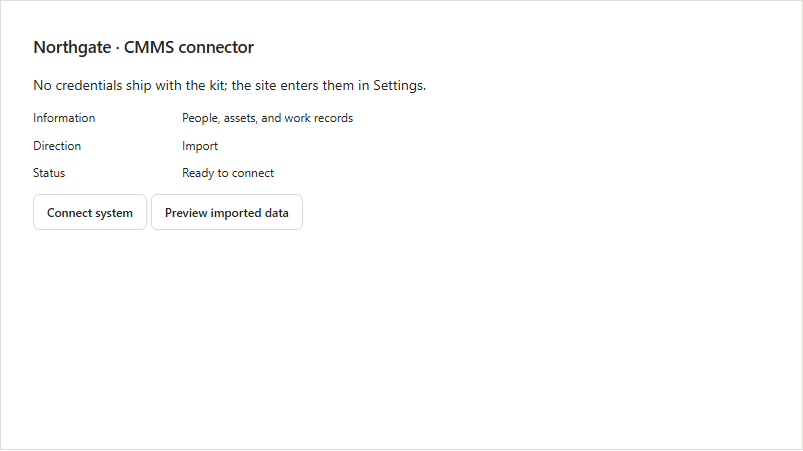
SkillSmith · Inspect what the CMMS source is prepared to import
Inspect what the CMMS source is prepared to import
Pay only when you see results
Agree the outcome for your first workflow with our team.
Trusted by leading organizations
“SkillSmith has always been very professional and responsive throughout the entire process and an absolute pleasure to work with.”
Paul HildebrandDirector of HSE/DOT, Jones Power
Configure connected information sources
Do the previewed rows and information direction match the intended source?
For a spreadsheet or CSV source, preview the information and its direction before using the rows. Resolve an unexpected field or record against the selected source.
WORKED DECISION
Resolve unexpected rows or fields
Decision point
Information to use
Responsible next step
Inputs to review
System name and Information type
Configure source.
Method action
Direction and Connection status
Inspect import preview.
Result to inspect
System resource and Preview rows
Inspect the available result within the permitted scope.
Review the selected material, this occurrence's response and any conditional follow-up.
Connected work across your team
Configure connected information sources
Start with system name and information type. The steps below show the actions and information available for this method.
Authorized editor or administrator
Configure source
Start with system name and information type. Configure source.
System name
Information type
Authorized editor or administrator
Inspect import preview
Inspect import preview. The result includes system resource and preview rows.
System resource
Preview rows
The difference in your team’s day
Support for unfamiliar situations
BeforeA configured connection is used without inspecting the information it shows.
With SkillSmithUse the system name, information type, direction and status alongside the preview rows to understand the configured source.
Traceable decisions and changes
BeforeThe current status hides which response or version came before it.
With SkillSmithFollow work history, resource versions and recorded decisions.
Connected information and agent support
The materials that make this method usable
Keep the relevant material available at the point it is used. The resource choices below support different parts of the work.
Your work context
Information to use
System name, Information type, Direction and Connection status.
Source context
A result to inspect
System resource and Preview rows.
Reviewed response
We bring the relevant context into your work
InputsProduct method
Inspect the result
Configure connected information sources
The job context
Your approved instructions
A clear response
Available to the right team member
Configure connected information sources
An existing system supplies useful information
System resource and Preview rows.
Keep the conversation moving
Take the method into your team's discussion
Use the product sheet to review the roles, materials, workflow and setup choices together.
Start with the materials and people you already have. We help make the setup choices explicit before your team uses the method.
01
Choose the working inputs
Review system name, information type, direction and connection status.
What we prepare togetherThe inputs and scope for this method are clear.
02
Agree who will use the method
Confirm the relevant people and their permitted scope: Authorized editor or administrator.
What we prepare togetherPeople use the method within the agreed responsibility and access.
03
Try the useful actions
Configure source and Inspect import preview.
What we prepare togetherThe source and information direction are explicit.
Talk with our team
We are here to help
Bring us the work your team wants to improve. We’ll walk through your instructions, responsibilities and review criteria, then show how our platform can support that work.
Bring your work; we help prepare the method
We work with your team to organize the source material, responsibilities and review choices. Start with one useful example, then carry the agreed method into everyday work.
Your materialUse the instructions, forms and references your team already maintains.
Practical preparationConnect the material to the people and responses needed for the method.
A useful walkthroughTry the ordinary route and the point where your team needs a different decision.
Rohit Singh
VP of Strategic Partnerships
Connecting your workflows with the systems and partners you rely on.
Brent Jackson
Director of Customer Success
Helping your team turn procedures into practical learning and task completion.
Your questions
Prepare the method for your team
What can we inspect after using this method?
The method provides system resource and preview rows. The source and information direction are explicit.
Who uses this method?
The permitted roles are Authorized editor or administrator. Confirm the people and their access for the selected example.
Which choices do we need to make first?
Review system name, information type, direction and connection status. Use those choices to prepare the first example and its permitted scope.
Do the previewed rows and information direction match the intended source?
The preview contains an unexpected row or field; resolve the mapping or source choice before relying on the imported information.