
Evidence and unknowns made visible
BeforeMissing information is read as a confirmed result.
With SkillSmithInspect supporting records and distinguish missing evidence from a confirmed outcome.
Configure Pulse and Insights templates
Choose columns, grouping, a panel title and display type, then preview the result against the data question the team needs to explore.
Edit layout; Add panel Describe data; Choose display Save and preview
Roles, playbooks and a practical launch plan for your team.
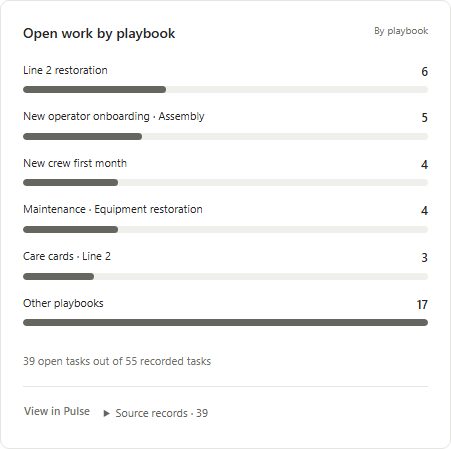
Review open work by playbook and open its source records

Agree the outcome for your first workflow with our team.
Trusted by leading organizations




“SkillSmith has always been very professional and responsive throughout the entire process and an absolute pleasure to work with.”
Paul HildebrandDirector of HSE/DOT, Jones Power
Configure Pulse and Insights templates
Start with columns and grouping. This method makes reusable report or dashboard available within its permitted scope.
WORKED DECISION
| Decision point | Information to use | Responsible next step |
|---|---|---|
| Inputs to review | Columns and Grouping | Edit layout. |
| Method action | Panel title, Data question and Display type | Add panel and Describe data. |
| Result to inspect | Reusable report or dashboard | Inspect the available result within the permitted scope. |
Connected work across your team
Start with columns and grouping. The steps below show the actions and information available for this method.
Resource owner or administrator
Start with columns and grouping. Edit layout and Add panel.
Resource owner or administrator
Describe data and Choose display with panel title, data question and display type in view.
Resource owner or administrator
Save and preview. The result includes reusable report or dashboard.
BeforeMissing information is read as a confirmed result.
With SkillSmithInspect supporting records and distinguish missing evidence from a confirmed outcome.
BeforeAutomation activity is used as a substitute for assessed quality.
With SkillSmithUse Real Metric to inspect change accuracy, process adherence, human review and understanding checks separately.
Connected information and agent support
Keep the relevant material available at the point it is used. The resource choices below support different parts of the work.
Your work context
Columns, Grouping, Panel title, Data question and Display type.
Reusable report or dashboard.

We bring the relevant
context into your work
Configure Pulse and Insights templates
Reusable report or dashboard.
Keep the conversation moving
Use the product sheet to review the roles, materials, workflow and setup choices together.
PDF · 6 pages
Our delivery approach
Start with the materials and people you already have. We help make the setup choices explicit before your team uses the method.
Review columns, grouping, panel title, data question and display type.
What we prepare togetherThe inputs and scope for this method are clear.
Confirm the relevant people and their permitted scope: Resource owner or administrator.
What we prepare togetherPeople use the method within the agreed responsibility and access.
Edit layout, Add panel, Describe data, Choose display and Save and preview.
What we prepare togetherThe configured template is available for permitted reporting.
Talk with our team
Bring us the work your team wants to improve. We’ll walk through your instructions, responsibilities and review criteria, then show how our platform can support that work.
We work with your team to organize the source material, responsibilities and review choices. Start with one useful example, then carry the agreed method into everyday work.
Your materialUse the instructions, forms and references your team already maintains.
Practical preparationConnect the material to the people and responses needed for the method.
A useful walkthroughTry the ordinary route and the point where your team needs a different decision.

VP of Strategic Partnerships
Connecting your workflows with the systems and partners you rely on.

Director of Customer Success
Helping your team turn procedures into practical learning and task completion.
Your questions
The method provides reusable report or dashboard. The configured template is available for permitted reporting.
The permitted roles are Resource owner or administrator. Confirm the people and their access for the selected example.
Review columns, grouping, panel title, data question and display type. Use those choices to prepare the first example and its permitted scope.
A chart is visually clear but its data question is ambiguous; define the question and preview the result before making it the team's reporting view.